Analance Business Intelligence
Analance Business Intelligence
Analance Business Intelligence
My Role & Impact
My Role & Impact
Role
Role
Senior Web Designer Lead
Senior Web Designer Lead
Company
Company
Sryas Sofware Pvt. Ltd.
Sryas Sofware Pvt. Ltd.
Duration
Duration
10 Months
10 Months
Team
Team
Product, Engineering, QA, Marketing
Product, Engineering, QA, Marketing
Contribution
Contribution
UX Strategy, Research, Experience Design, interactive HTML prototypes, and Testing
UX Strategy, Research, Experience Design, interactive HTML prototypes, and Testing
Outcome
Outcome
Reduced user training time by 82%, support tickets by 67%, and dashboard creation time from 2+ hours to 15 minutes, significantly improving operational efficiency and usability.
Reduced user training time by 82%, support tickets by 67%, and dashboard creation time from 2+ hours to 15 minutes, significantly improving operational efficiency and usability.
Domain
Domain
Business Intelligence & Analytics
Business Intelligence & Analytics
Overview
Overview
Analance Business Intelligence was a powerful but notoriously difficult-to-use analytics platform serving enterprise clients. The tool had strong data processing capabilities but suffered from poor visual design, confusing navigation, and a cluttered interface that required extensive training. My role was to completely redesign the user experience while maintaining all existing functionality and data connections.
Analance Business Intelligence was a powerful but notoriously difficult-to-use analytics platform serving enterprise clients. The tool had strong data processing capabilities but suffered from poor visual design, confusing navigation, and a cluttered interface that required extensive training. My role was to completely redesign the user experience while maintaining all existing functionality and data connections.
Analance Business Intelligence was a powerful but notoriously difficult-to-use analytics platform serving enterprise clients. The tool had strong data processing capabilities but suffered from poor visual design, confusing navigation, and a cluttered interface that required extensive training. My role was to completely redesign the user experience while maintaining all existing functionality and data connections.
The Problem
The Problem
The original Analance BI tool was built by engineers for engineers, with little consideration for user experience. Business users found the interface intimidating and confusing, with critical features buried in nested menus. The visual design felt dated and overwhelming, using small fonts, dense tables, and unclear information hierarchy. Companies were paying for the platform but had low adoption rates because non-technical users couldn't navigate it independently. Training sessions regularly exceeded 3 days, and even then, users only learned basic functions.
The original Analance BI tool was built by engineers for engineers, with little consideration for user experience. Business users found the interface intimidating and confusing, with critical features buried in nested menus. The visual design felt dated and overwhelming, using small fonts, dense tables, and unclear information hierarchy. Companies were paying for the platform but had low adoption rates because non-technical users couldn't navigate it independently. Training sessions regularly exceeded 3 days, and even then, users only learned basic functions.
The original Analance BI tool was built by engineers for engineers, with little consideration for user experience. Business users found the interface intimidating and confusing, with critical features buried in nested menus. The visual design felt dated and overwhelming, using small fonts, dense tables, and unclear information hierarchy. Companies were paying for the platform but had low adoption rates because non-technical users couldn't navigate it independently. Training sessions regularly exceeded 3 days, and even then, users only learned basic functions.
Enterprise Stakeholder & Process Analysis
Enterprise Stakeholder & Process Analysis
Conducted end-to-end discovery research across multiple enterprise clients to understand how business users and data analysts interacted with the existing Business Intelligence platform. Synthesized insights from workflow observations, heuristic evaluations, support ticket analysis, stakeholder interviews, and competitive benchmarking to uncover usability challenges, workflow inefficiencies, and opportunities to improve data visualization and dashboard experiences.
Conducted end-to-end discovery research across multiple enterprise clients to understand how business users and data analysts interacted with the existing Business Intelligence platform. Synthesized insights from workflow observations, heuristic evaluations, support ticket analysis, stakeholder interviews, and competitive benchmarking to uncover usability challenges, workflow inefficiencies, and opportunities to improve data visualization and dashboard experiences.
Conducted end-to-end discovery research across multiple enterprise clients to understand how business users and data analysts interacted with the existing Business Intelligence platform. Synthesized insights from workflow observations, heuristic evaluations, support ticket analysis, stakeholder interviews, and competitive benchmarking to uncover usability challenges, workflow inefficiencies, and opportunities to improve data visualization and dashboard experiences.
Key Insights
Key Insights
Business users spent 50% of their time searching for features rather than analyzing data
Business users spent 50% of their time searching for features rather than analyzing data
Business users spent 50% of their time searching for features rather than analyzing data
The existing interface used 8-point font in critical areas, causing eye strain and errors
The existing interface used 8-point font in critical areas, causing eye strain and errors
The existing interface used 8-point font in critical areas, causing eye strain and errors
Users relied heavily on data analysts because the tool's complexity made self-service impossible
Users relied heavily on data analysts because the tool's complexity made self-service impossible
Users relied heavily on data analysts because the tool's complexity made self-service impossible
80% of users only accessed 20% of features - the rest were hidden or unknown
80% of users only accessed 20% of features - the rest were hidden or unknown
80% of users only accessed 20% of features - the rest were hidden or unknown
Color usage was inconsistent and provided no meaningful information hierarchy
Color usage was inconsistent and provided no meaningful information hierarchy
Color usage was inconsistent and provided no meaningful information hierarchy
Users wanted visual charts but the system defaulted to dense data tables
No workflow automation, every handoff required manual emails, phone calls, and status tracking in spreadsheets
Users wanted visual charts but the system defaulted to dense data tables
User Personas
Rachel Cooper
Rachel Cooper
42 years old, VP of Sales
42 years old, VP of Sales
Goals
•
Track team performance and pipeline health without analyst support
Track team performance and pipeline health without analyst support
Track team performance and pipeline health without analyst support
•
Quickly identify trends in sales data
Quickly identify trends in sales data
Quickly identify trends in sales data
•
Create presentation-ready reports for leadership meetings
Create presentation-ready reports for leadership meetings
Create presentation-ready reports for leadership meetings
Pain Points
•
Can't remember where to find key reports in the nested menu system
Can't remember where to find key reports in the nested menu system
Can't remember where to find key reports in the nested menu system
•
Overwhelmed by the cluttered interface and technical jargon
Overwhelmed by the cluttered interface and technical jargon
Overwhelmed by the cluttered interface and technical jargon
•
Wastes time reformatting ugly default charts for presentations
Wastes time reformatting ugly default charts for presentations
Wastes time reformatting ugly default charts for presentations
•
Needs to call IT support for simple tasks like filtering data
Needs to call IT support for simple tasks like filtering data
Needs to call IT support for simple tasks like filtering data
Tom Zhang
31 years old • Data Analyst
31 years old • Data Analyst
Goals
•
Build clear dashboards for different departments
Build clear dashboards for different departments
Build clear dashboards for different departments
•
Reduce time spent on repetitive training and support requests
Reduce time spent on repetitive training and support requests
Reduce time spent on repetitive training and support requests
•
Create visualizations that stakeholders can actually understand
Create visualizations that stakeholders can actually understand
Create visualizations that stakeholders can actually understand
Pain Points
•
Spends hours each week helping users navigate basic features
Spends hours each week helping users navigate basic features
Spends hours each week helping users navigate basic features
•
Limited chart customization options make it hard to create compelling visuals
Limited chart customization options make it hard to create compelling visuals
Limited chart customization options make it hard to create compelling visuals
•
Dashboard layout tools are rigid and difficult to arrange logically
Dashboard layout tools are rigid and difficult to arrange logically
Dashboard layout tools are rigid and difficult to arrange logically
•
Can't create consistent designs across different reports
Can't create consistent designs across different reports
Can't create consistent designs across different reports
Ideation & Approach
Ideation & Approach
Partnered with cross-functional stakeholders to define a future-state vision for the Analance platform. Through collaborative ideation sessions and iterative concept exploration, we challenged existing workflows and reimagined how users interact with business data. The design approach focused on simplifying analytical tasks, improving information architecture, enhancing visual hierarchy, and creating an experience that empowered users to explore data intuitively while supporting complex enterprise reporting needs.
Partnered with cross-functional stakeholders to define a future-state vision for the Analance platform. Through collaborative ideation sessions and iterative concept exploration, we challenged existing workflows and reimagined how users interact with business data. The design approach focused on simplifying analytical tasks, improving information architecture, enhancing visual hierarchy, and creating an experience that empowered users to explore data intuitively while supporting complex enterprise reporting needs.
1
Complete information architecture redesign with user-centric navigation based on tasks, not technical features
Complete information architecture redesign with user-centric navigation based on tasks, not technical features
2
Visual dashboard builder with drag-and-drop functionality and live preview
Visual dashboard builder with drag-and-drop functionality and live preview
3
Role-based dashboard templates that serve common business scenarios.
Role-based dashboard templates that serve common business scenarios
out-of-the-box
Role-based dashboard templates that serve common business scenarios.
4
Comprehensive visualization library with clear guidance on when to use each chart type
Comprehensive visualization library with clear guidance on when to use each chart type
5
Improved data table design with better typography, spacing, and interactive sorting/filtering
Improved data table design with better typography, spacing, and interactive sorting/filtering
6
Contextual help system with embedded tooltips and progressive disclosure of advanced features
Contextual help system with embedded tooltips and progressive disclosure of advanced features
Design Process
Design Process
Information Architecture Redesign
Redesigned the platform's information architecture by synthesizing user insights, stakeholder feedback, and existing workflow patterns to better align with users' mental models. Reorganized the navigation from a feature-centric structure to a task-oriented experience, making key workflows easier to discover and complete. Developed a simplified sitemap that reduced navigation complexity, improved findability, and created a more intuitive and scalable foundation for future product growth.
Redesigned the platform's information architecture by synthesizing user insights, stakeholder feedback, and existing workflow patterns to better align with users' mental models. Reorganized the navigation from a feature-centric structure to a task-oriented experience, making key workflows easier to discover and complete. Developed a simplified sitemap that reduced navigation complexity, improved findability, and created a more intuitive and scalable foundation for future product growth.
Visual Design System Creation
Developed a comprehensive design system with improved typography, consistent color palette, standardized spacing, and a complete icon library. Established clear visual hierarchy principles and created reusable UI components for consistent experience across all features.
Developed a comprehensive design system with improved typography, consistent color palette, standardized spacing, and a complete icon library. Established clear visual hierarchy principles and created reusable UI components for consistent experience across all features.
Dashboard & Visualization Redesign
Redesigned all chart types with better defaults, clearer labeling, and improved visual appeal. Created an intuitive drag-and-drop dashboard builder that allows users to create custom layouts visually. Developed template library for common business dashboards.
Redesigned all chart types with better defaults, clearer labeling, and improved visual appeal. Created an intuitive drag-and-drop dashboard builder that allows users to create custom layouts visually. Developed template library for common business dashboards.
Usability Testing & Iteration
Collaborated with business users to evaluate key workflows using interactive prototypes, focusing on usability, task efficiency, and overall user experience. Synthesized feedback across multiple rounds of evaluation to identify friction points, validate design decisions, and continuously refine the interface. The iterative process resulted in a more intuitive, efficient, and user-centered experience that significantly improved usability over the legacy system.
Collaborated with business users to evaluate key workflows using interactive prototypes, focusing on usability, task efficiency, and overall user experience. Synthesized feedback across multiple rounds of evaluation to identify friction points, validate design decisions, and continuously refine the interface. The iterative process resulted in a more intuitive, efficient, and user-centered experience that significantly improved usability over the legacy system.
Developer Collaboration & QA
Worked closely with development team to ensure pixel-perfect implementation. Created detailed specifications for interactions, transitions, and responsive behavior. Conducted regular design QA throughout development to maintain quality.
Worked closely with development team to ensure pixel-perfect implementation. Created detailed specifications for interactions, transitions, and responsive behavior. Conducted regular design QA throughout development to maintain quality.
The Solution
The redesigned Analance Business Intelligence platform featured a clean, modern interface with intuitive navigation, beautiful data visualizations, and a powerful yet simple dashboard builder. The new design dramatically reduced learning curve while maintaining all the robust functionality that enterprise clients relied on. Business users could now create professional dashboards independently, and the visual appeal made data analysis feel engaging rather than tedious
The redesigned Analance Business Intelligence platform featured a clean, modern interface with intuitive navigation, beautiful data visualizations, and a powerful yet simple dashboard builder. The new design dramatically reduced learning curve while maintaining all the robust functionality that enterprise clients relied on. Business users could now create professional dashboards independently, and the visual appeal made data analysis feel engaging rather than tedious
Intuitive Dashboard Builder
Intuitive Dashboard Builder
Drag-and-drop interface for creating custom dashboards with live preview. Widget library with pre-configured charts, tables, and KPI cards. Flexible grid system with automatic responsiveness. No coding or technical knowledge required.
Drag-and-drop interface for creating custom dashboards with live preview. Widget library with pre-configured charts, tables, and KPI cards. Flexible grid system with automatic responsiveness. No coding or technical knowledge required.
Enhanced Data Visualizations
Enhanced Data Visualizations
Completely redesigned chart library with 11+ visualization types. Smart defaults that choose appropriate colors, labels, and formatting. Interactive features like drill-down, tooltips, and dynamic filtering. Export-ready visuals for presentations.
Completely redesigned chart library with 11+ visualization types. Smart defaults that choose appropriate colors, labels, and formatting. Interactive features like drill-down, tooltips, and dynamic filtering. Export-ready visuals for presentations.
Role-Based Templates
Role-Based Templates
Pre-built dashboard templates for Sales, Marketing, Finance, Operations, and Executive views. One-click customization to connect to user's specific data sources. Template gallery with preview images showing exactly what users will get.
Pre-built dashboard templates for Sales, Marketing, Finance, Operations, and Executive views. One-click customization to connect to user's specific data sources. Template gallery with preview images showing exactly what users will get.
Task-Oriented Navigation
Task-Oriented Navigation
Reorganized menu structure based on user tasks rather than technical features. Persistent top navigation with clear labels. Breadcrumb trails and contextual menus. Quick access to frequently used functions.
Reorganized menu structure based on user tasks rather than technical features. Persistent top navigation with clear labels. Breadcrumb trails and contextual menus. Quick access to frequently used functions.
Improved Data Tables
Improved Data Tables
Clean, readable tables with proper spacing and typography. Interactive sorting, filtering, and searching built-in. Column customization with drag-to-reorder. Conditional formatting to highlight important values.
Clean, readable tables with proper spacing and typography. Interactive sorting, filtering, and searching built-in. Column customization with drag-to-reorder. Conditional formatting to highlight important values.
Contextual Help System
Contextual Help System
Embedded tooltips explaining each feature in plain language. Progressive disclosure showing advanced options only when needed. Video tutorials linked from relevant screens. Searchable help center with task-based articles.
Embedded tooltips explaining each feature in plain language. Progressive disclosure showing advanced options only when needed. Video tutorials linked from relevant screens. Searchable help center with task-based articles.
Professional Visual Design
Professional Visual Design
Modern, clean aesthetic with appropriate use of whitespace. Consistent color system that conveys meaning. Readable typography with proper hierarchy. Professional look that makes reports presentation-ready by default. Designed to meet WCAG 2.0 Level AA accessibility standards.
Modern, clean aesthetic with appropriate use of whitespace. Consistent color system that conveys meaning. Readable typography with proper hierarchy. Professional look that makes reports presentation-ready by default. Designed to meet WCAG 2.0 Level AA accessibility standards.
Sample Old Screens
Sample Old Screens
Sample Old Screens
Dashboard
Dashboard
Dashboard

Data Table
Data Table
Data Table

Interface Redesign Screens
Interface Redesign Screens
Interface Redesign Screens
These screens demonstrate the transformation from a cluttered, technical interface to a clean, intuitive business intelligence platform. The redesign focused on visual clarity, task-based navigation, and beautiful data visualizations.
These screens demonstrate the transformation from a cluttered, technical interface to a clean, intuitive business intelligence platform. The redesign focused on visual clarity, task-based navigation, and beautiful data visualizations.
These screens demonstrate the transformation from a cluttered, technical interface to a clean, intuitive business intelligence platform. The redesign focused on visual clarity, task-based navigation, and beautiful data visualizations.
Desktop Web Application
Desktop Web Application
Desktop Web Application
Intuitive Dashboard Builder
Intuitive Dashboard Builder
Intuitive Dashboard Builder
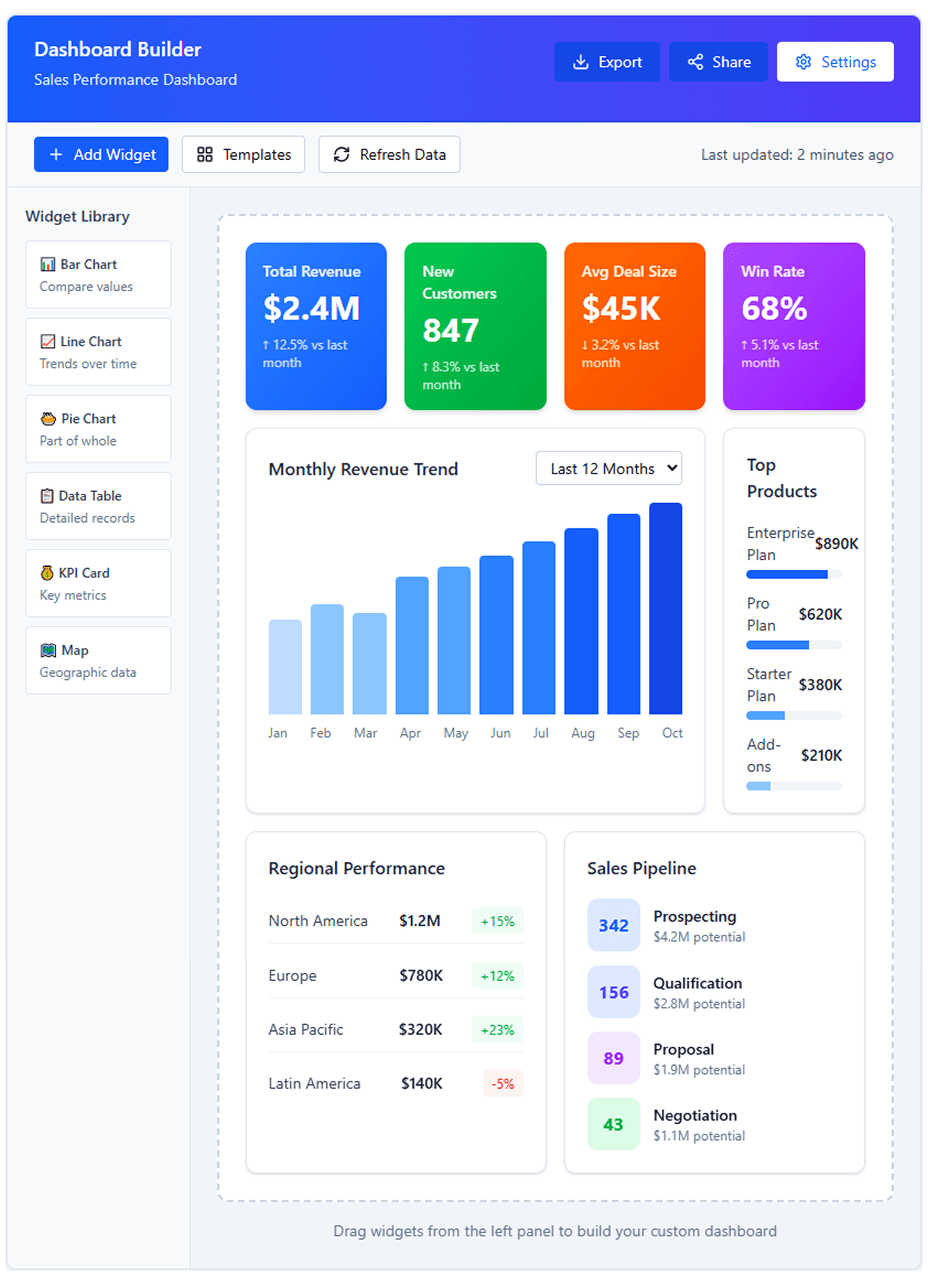
Drag-and-drop interface for creating custom dashboards with live preview. Business users can build professional dashboards independently without requiring technical knowledge or analyst support. The widget library provides pre-configured charts with smart defaults.
Drag-and-drop interface for creating custom dashboards with live preview. Business users can build professional dashboards independently without requiring technical knowledge or analyst support. The widget library provides pre-configured charts with smart defaults.
Drag-and-drop interface for creating custom dashboards with live preview. Business users can build professional dashboards independently without requiring technical knowledge or analyst support. The widget library provides pre-configured charts with smart defaults.
Improved Data Tables with Better Typography
Improved Data Tables with Better Typography
Improved Data Tables with Better Typography
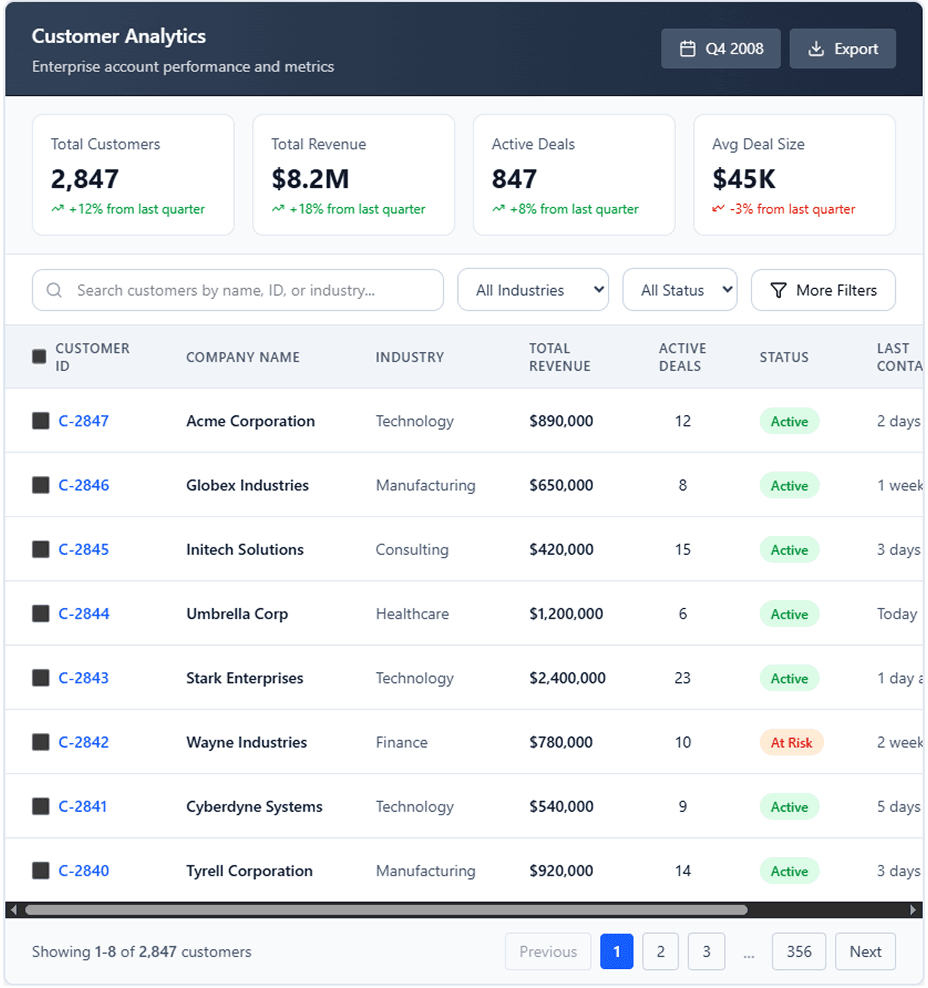
Redesigned data tables with proper spacing, readable fonts (no more 8-point text!), and intuitive filtering. The clean layout with clear visual hierarchy makes scanning large datasets efficient. Interactive sorting and search functionality built-in.
Redesigned data tables with proper spacing, readable fonts (no more 8-point text!), and intuitive filtering. The clean layout with clear visual hierarchy makes scanning large datasets efficient. Interactive sorting and search functionality built-in.
Redesigned data tables with proper spacing, readable fonts (no more 8-point text!), and intuitive filtering. The clean layout with clear visual hierarchy makes scanning large datasets efficient. Interactive sorting and search functionality built-in.
Key Learnings
💡
Enterprise redesigns should feel familiar while solving real usability problems.
Enterprise redesigns should feel familiar while solving real usability problems.
💡
Clear, simple interfaces help users trust and understand their data.
Clear, simple interfaces help users trust and understand their data.
💡
Task-based navigation is more intuitive than feature-based navigation.
Task-based navigation is more intuitive than feature-based navigation.
💡
Show users only what they need first, then reveal advanced features when required.
Show users only what they need first, then reveal advanced features when required.
💡
A strong design system and continuous user feedback create scalable, consistent experiences.
A strong design system and continuous user feedback create scalable, consistent experiences.
A strong design system and continuous user feedback create scalable, consistent experiences.
© 2026 Raja Madhanagopal | Product Designer | UX Strategy | Product Innovation | Fintech | B2B & B2C Platforms | AI-Augmented Product Design. All rights reserved.
© 2026 Raja Madhanagopal | Product Designer | UX Strategy | Product Innovation | Fintech | B2B & B2C Platforms | AI-Augmented Product Design. All rights reserved.
© 2026 Raja Madhanagopal | Product Designer | UX Strategy | Product Innovation | Fintech | B2B & B2C Platforms | AI-Augmented Product Design. All rights reserved.